


ETM: AI Image Generator
3.5953.00 Reviews
App Specs
- Version
- 2.00.10
- Updated On
- License
- Free
- Downloads
- 1,000,000+
- Developer
- ArtVibe Labs
- Categories
- Photography
- Platform
- Android, iOS
Screenshots
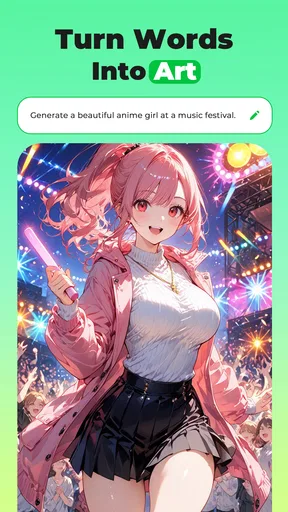
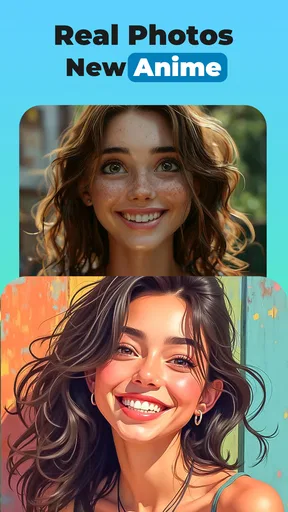
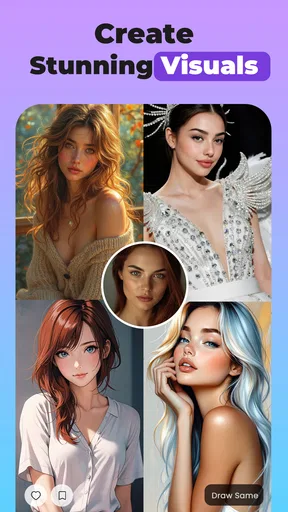
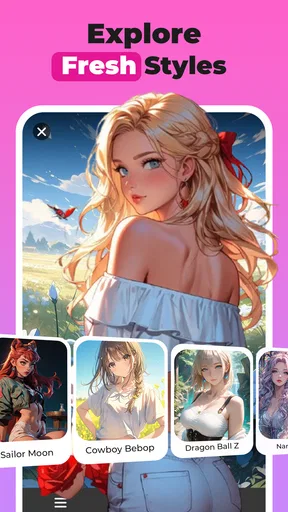
 Analysis by AppCompare
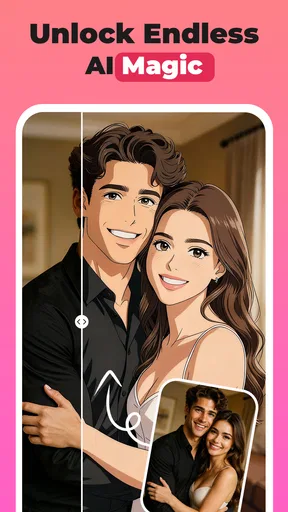
I approached ETM as a first-time user would: looking for a quick way to turn an idea, selfie, or rough sketch into an image without needing to learn a full editing program. It is a photography app from ArtVibe Labs, and its focus is creative transformation rather than the careful, hands-on retouching you get from a conventional photo editor. That distinction matters: I’d use it to explore visual ideas and make stylized results, not as my main tool for correcting a photograph pixel by pixel.
What to expect from the first session
The central appeal is the range of looks the app is designed to create, from anime and comic-inspired images to 3D or more realistic treatments. That makes it useful when you want to see one subject interpreted in different visual directions. It is free to install, though in-app purchases range from $2.99 to $79.99 per item, so I would check what is included before paying for anything. Its Mature 17+ age rating is also worth considering if you are choosing an app for a younger person.
My main expectation would be experimentation, not a guaranteed exact match to a mental picture. AI image tools can interpret a prompt or source image in surprising ways; a result that is technically attractive may still miss the detail you cared about. I find it more productive to treat the first output as a draft and decide what to adjust, rather than expecting one tap to deliver a finished image every time.
A practical route from install to a useful result
For a first attempt, choose a clear subject and a photo or sketch where the important shapes are easy to read. A well-lit selfie with an uncluttered background gives the transformation less visual noise to contend with. If you are starting from words, describe the subject and the intended style plainly before adding decorative details. This gives you a useful baseline: if the result is off, you can identify whether the subject, style, or extra wording caused the mismatch.
For example, if I wanted a playful profile image, I would begin with a straightforward portrait and one clear style direction rather than piling on several incompatible references. I would compare the result with the original for recognizable features, then decide whether another try is worth it. This small, controlled workflow is more informative than changing the input and style all at once, because it helps you learn what actually improves the image.
How it fits beside other creative apps
Compared with a standard photo editor, ETM is aimed at changing the overall visual character of an image rather than giving you fine control over exposure, cropping, or individual blemishes. Compared with drawing software, it can help you explore a concept without beginning with a blank canvas, but it does not replace the satisfaction or precision of drawing the details yourself. I’d reach for it when I want a fast visual variation; I’d choose a traditional editor for accurate corrections and a drawing app for deliberate, hands-on illustration.
That makes it a better fit for casual experimentation, social profile concepts, mood boards, or a quick visual gift than for professional work where a client expects exact likeness, consistent branding, or repeatable results. If you need a specific face to remain completely faithful, or want control over every line and color, I would keep a conventional editing or illustration tool in the workflow instead of relying on an AI transformation alone.
Worth Reading Before You Choose

How SHEIN Turns Fashion Browsing Into a Daily Habit
Google’s Search App Is Becoming the Front Door to Your Day

Gmail on a Crowded Monday: Who Should Use It and Who Shouldn’t

Capital One Mobile Keeps Everyday Banking Clear and Under Control

Lyft Makes Letting Someone Else Drive Feel Routine

Google Maps Gets You There, Until the Map and the Moment Disagree
Small choices that improve the workflow
One useful habit is to keep the first prompt short and specific, then change only one element on a follow-up attempt. If you switch the subject description, style, and mood together, it becomes hard to tell which change helped. For a sketch, make the main outline readable and avoid putting several competing focal points into the same image. For a selfie, choose a source where the face is not hidden by strong shadows or objects; the clearer the starting point, the easier it is to judge whether the transformation worked.
I would also save the original photo or sketch separately before experimenting. That gives you a clean reference and avoids treating an AI-generated variation as a replacement for the source. If the app offers different finishing or sharing choices during your session, preview the image at the size you plan to use it. A detail that looks fine on a phone screen may feel different when cropped into a small avatar, so check the intended use before you share.
Who will enjoy it, and who may not
ETM makes the most sense for someone who enjoys trying different looks and is comfortable judging results as creative interpretations. A casual creator can use it to make a conversation-starting avatar, test an anime-like version of a selfie, or turn a rough idea into a visual reference before drawing it properly. It may also be handy when you need a quick starting point for a themed post and do not want to build the image from scratch.
I would skip it if your priority is precise retouching, dependable reproduction of a particular person, or a professional workflow with strict control over every output. I would also be cautious about spending before I know how often I will use the app: the free entry point is inviting, but the broad purchase range means it is sensible to understand the cost of any optional item first. With an average rating of 3.7 from around 16,000 ratings and over one million installs, it has attracted a sizeable audience, though those figures alone cannot tell you whether its results will suit your taste.
Questions worth answering before you begin
Will it work for a first-time AI art user? The app is presented as approachable, and its appeal is that you can begin with an image or a simple idea rather than advanced art skills. I would still approach the first session as a test: use a source you are happy to experiment with, try one clear direction, and decide whether the result is useful before investing more time.
Can it make a picture exactly as imagined? I would not count on exactness. The more particular the intended face, pose, or small object, the more likely you are to need patience or a different tool. Can it replace an editor? Not for detailed corrections or careful layout; it is better understood as a creative transformation app. And is it suitable for every age? Its Mature 17+ rating means it is not a choice I would make casually for a child.
ETM was released on October 6, 2023, and version 2.00.06 requires Android 7.0 or later. It has a 3.7 average across around 16,000 ratings, with around 928 reviews, and more than one million installs. Those figures suggest that it is established enough to be familiar to many users, but I would judge it by whether its particular image styles fit the way you want to create.
Ever fancied turning your wildest imaginations into stunning visuals without the need for a degree in graphic design? Well, buckle up because I've been diving deep into ETM: AI Image Generator, and I'm here to spill the beans on this nifty little app.
Getting Started with ETM: AI Image Generator
First off, the onboarding process is smooth as silk. You download it from your favorite app store, and bam, you’re greeted with a sleek and intuitive interface. No need to fumble around in the dark here. The app guides you through the basics without any fuss, so even if you're a total newbie to AI-generated art, you're in good hands.
The Magic of AI-Powered Creativity
Now, onto the juicy bits. The real charm of ETM: AI Image Generator is, of course, its AI. It’s like having your own personal Picasso in your pocket. You simply type in a few keywords, adjust some parameters if you're feeling adventurous, and watch as the app conjures up a masterpiece right before your eyes.
The AI is impressively versatile. Whether you're into dreamy landscapes, abstract art, or even something more outlandish, it’s got you covered. I found myself lost in a creative rabbit hole, constantly amazed at the diversity and quality of the images it produced.
User Experience: A Seamless Ride
One of the standout features for me was how user-friendly the app is. The developers have clearly put a lot of thought into making everything intuitive. The navigation is a breeze, and the app provides helpful tips and hints along the way. It's clear that ETM is designed with the user in mind, making the creative process as enjoyable as possible.
Plus, the app runs smoothly without any hiccups. No annoying crashes or glitches to interrupt your creative flow. It's as if the app is a well-oiled machine, always ready to whip up something spectacular.
Customization Galore
One thing I absolutely loved is the level of customization available. You can tweak various settings to really tailor the output to your liking. Want something more vibrant? More muted? No problem. The app's got a ton of sliders and options to make sure you get exactly what you want.
And if you're ever feeling stuck or uninspired, the app has a treasure trove of pre-set themes and styles to kickstart your creativity. It's like having a toolbox full of artistic goodies at your disposal.
Sharing Your Creations
Once you’ve crafted your masterpiece, sharing it is a breeze. The app makes it super easy to post your creations on social media or save them to your device. It even offers some nifty options for adding finishing touches before you hit the share button. So, if you're looking to impress your friends or just want to add some flair to your social media feed, ETM: AI Image Generator has got your back.
Final Thoughts
In a nutshell, ETM: AI Image Generator is a game-changer for anyone looking to dive into the world of AI-generated art. It’s user-friendly, powerful, and endlessly fun to use. Whether you’re an aspiring artist or just someone who loves to dabble, this app is a must-have. So go ahead, give it a whirl, and let your imagination run wild. Trust me, you won’t be disappointed!
Pros
- User-friendly interface for easy navigation.
- High-quality image outputs consistently.
- Fast processing with minimal wait times.
- Variety of styles and filters available.
- Supports multiple image formats.
Cons
- Limited free features; subscription needed.
- Occasional glitches in complex scenes.
- In-app ads can be intrusive at times.
- Requires stable internet connection.
- High battery consumption during use.
FAQs for ETM: AI Image Generator
What is ETM: AI Image Generator and how does it work?
ETM: AI Image Generator is an innovative app that allows users to create stunning images using advanced AI technology. By inputting text prompts or selecting various styles, the app generates unique visuals that are both artistic and customizable. It's perfect for designers, artists, and anyone looking to explore their creativity.
Is ETM: AI Image Generator free to use?
ETM: AI Image Generator offers a free version with basic features, allowing users to explore its capabilities without any cost. However, to access premium features such as higher resolution images and exclusive styles, users can opt for a subscription model which offers more extensive creative tools.
What platforms is ETM: AI Image Generator available on?
ETM: AI Image Generator is available on both Android and iOS platforms. This ensures a seamless experience whether you’re using a smartphone or tablet, allowing you to create on the go. Simply download it from the Google Play Store or Apple App Store to get started.
Does ETM: AI Image Generator require an internet connection?
Yes, ETM: AI Image Generator requires an internet connection to function properly. This is because the app relies on cloud-based AI processing to generate images. A stable internet connection ensures that you can access all features and receive the best quality images quickly.
What types of styles can I create with ETM: AI Image Generator?
ETM: AI Image Generator offers a diverse range of styles, from abstract art to realistic imagery. Users can choose from various presets or customize their own styles by adjusting parameters like color, texture, and complexity. The app is designed to cater to both novice users and professional creators.


